What is it worth?

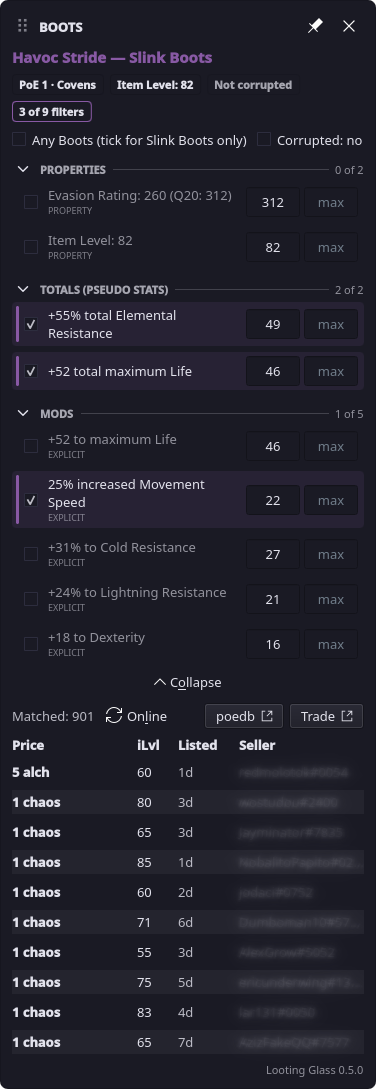
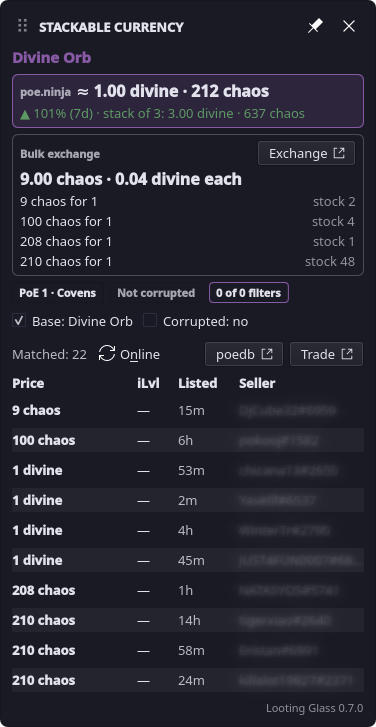
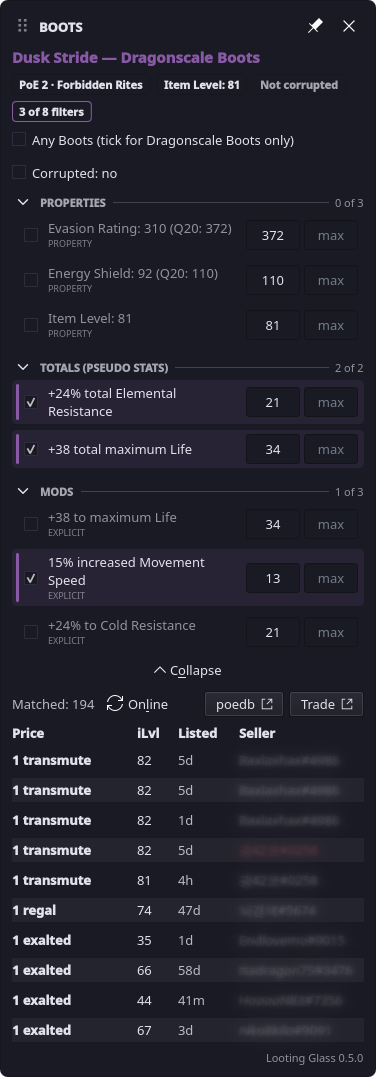
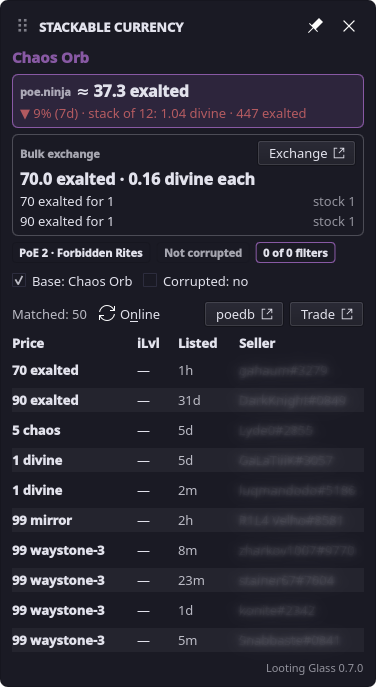
Hover an item in Path of Exile 1 or Path of Exile 2, press a hotkey, and Looting Glass shows live listings from the official trade site and poe.ninja prices on top of the game. Native Rust and Qt: no Electron, no browser.

KDE Plasma on Wayland is the tested platform. Windows and Hyprland are experimental.

Path of Exile
PoE 1 rare boots with editable stat filters and trade listings PoE 1 Divine Orb with its poe.ninja value
Path of Exile 2
PoE 2 rare item with editable stat filters and trade listings PoE 2 currency with its poe.ninja value

Features

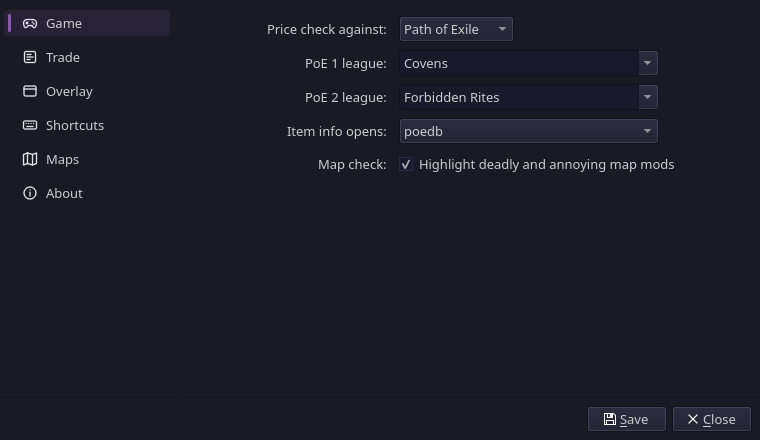
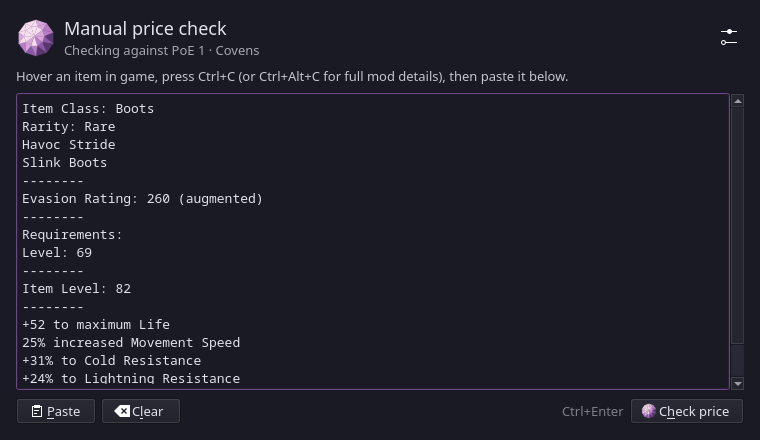
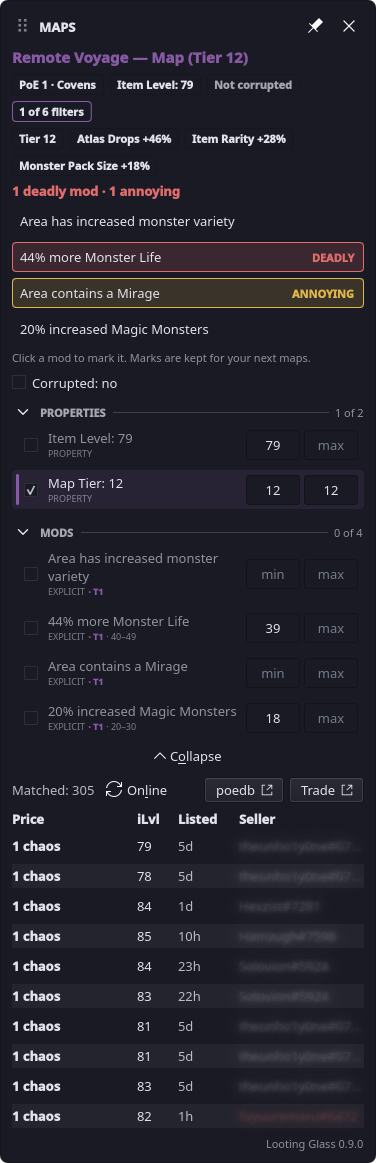
Settings: game and league per game Manual price check window with pasted item text Map check: a map's mods with deadly and annoying ones marked

Install

The download buttons get the latest releasev0.9.2. Checksums and older versions are on GitHub releases.

Linux

Needs KDE Plasma 6 on Wayland and Qt 6. On Arch / CachyOS, install the runtime libraries (already there on most Plasma desktops):

sudo pacman -S --needed qt6-declarative layer-shell-qt kirigami qqc2-desktop-style

Then, in the folder you downloaded it to:

tar xzf lootingglass-*-x86_64.tar.gz
cd lootingglass-*-x86_64
./install.sh

The release binaries are built on Arch and need a Qt at least that new, so a rolling distro (Arch, CachyOS, EndeavourOS) is the safe bet. Elsewhere, build from source.

Arch Linux package

Until lootingglass-bin is on the AUR, build the same package from the repository. It installs through pacman with its dependencies, and pacman -R lootingglass-bin removes it.

git clone https://github.com/looting-glass/desktop.git looting-glass
cd looting-glass/packaging/aur/lootingglass-bin
makepkg -si

Windows experimental

The installer sets it up for your user only (no admin rights), adds a Start menu entry, can start with Windows and uninstalls from Settings → Apps. For the portable version, extract the .zip anywhere and run lootingglass.exe.

The downloads aren't code-signed yet, so SmartScreen may warn you: click More info → Run anyway. Run the game in windowed fullscreen; Windows can't draw the overlay over exclusive fullscreen.

From source

Needs Rust (edition 2024), a C++ compiler and the Qt packages above, plus qt6-base.

sudo pacman -S --needed rustup qt6-base qt6-declarative \
    layer-shell-qt kirigami qqc2-desktop-style
git clone https://github.com/looting-glass/desktop.git looting-glass
cd looting-glass
./install.sh

install.sh installs to ~/.local/bin/lootingglass with a launcher entry and icon. Start Looting Glass from the application launcher; it lives in the system tray.

Usage

  1. In the game, hover an item and press Ctrl+D.
  2. The first time, KDE asks you to confirm the shortcuts and to let Looting Glass control the keyboard, so it can press Ctrl+C in the game. Both are remembered.
  3. Adjust the filters if you like. The search updates automatically.
  4. Press Esc or Space, or click back into the game, to close the overlay. To keep it open while you play, click the pin next to ✕: it then stays until you press ✕ or Esc.

Manual price check

Click the tray icon (or Manual check… in its menu), paste the item text and press Check price or Ctrl+Enter. The results open in the overlay as usual.

Map check PoE 1

Assign the Map check shortcut, hover a map and press it. The overlay lists the map's mods: click one to mark it annoying, again for deadly, and once more to clear it. Marks cover every roll of a mod, so the next map with a mod you can't run shows it in red right away. Settings → Maps lists the marks; Settings → Game turns the check off.

Shortcuts

ActionDefault
Price check hovered itemCtrl+D
Switch between PoE 1 and PoE 2unassigned
Open settingsunassigned
Open manual price checkunassigned
Hide overlayunassigned
Open hovered item on poedb or the wikiunassigned
Map check: hovered map's modsunassigned

On KDE, change them in System Settings → Shortcuts → Looting Glass. On Windows, type them into Looting Glass's own Settings → Shortcuts (for example Ctrl+Shift+F7).

Hyprland experimental

Hyprland doesn't let apps choose their own keys, so bind them in hyprland.conf:

bind = CTRL, D, global, dev.lootingglass.LootingGlass:price-check
bind = , F7, global, dev.lootingglass.LootingGlass:toggle-game     # optional

The shortcut ids are price-check, toggle-game, settings, manual-check, hide-overlay, item-info and map-check. If a bind does nothing, hyprctl globalshortcuts shows the names your portal registered.

Settings

Click the tray icon to open the settings window, or edit ~/.config/lootingglass/config.toml (on Windows %APPDATA%\lootingglass\config.toml) by hand:

game = "poe1"            # or "poe2"
contact = ""             # optional, appended to the User-Agent sent to the trade API

[poe1]
league = "Standard"

[poe2]
league = "Standard"

[trade]
status = "online"        # "online", "any", or "securable" (PoE 2 instant buyout)
stat_tolerance = 10      # % below your roll used as the filter minimum
min_from_tier = false    # with Ctrl+Alt+C text: minimum = bottom of the mod's tier range
max_results = 20

[map_check]              # PoE 1 maps
enabled = true
deadly = ["Monsters reflect #% of Elemental Damage"]   # mod text, numbers as #
annoying = []

[overlay]
side = "right"
margin_top = 80
margin_side = 24
width = 380
max_height = 0           # 0 = fit content
pinned = false           # true = stay open when clicking the game

[shortcuts]              # Windows only; on Linux shortcuts belong to the desktop
price_check = "Ctrl+D"

Troubleshooting

The overlay has a title bar or isn't on top.
Looting Glass has to run as a native Wayland client. It overrides QT_QPA_PLATFORM=xcb for itself, but started with LOOTINGGLASS_ALLOW_X11=1 the overlay can't use layer-shell.
"The game didn't copy anything".
Make sure the cursor is over an item and that you allowed keyboard control when KDE asked. To reset that permission, delete ~/.local/state/lootingglass/remote-desktop.token and restart Looting Glass.
On Windows, the overlay doesn't show over the game.
Switch the game to windowed fullscreen (borderless). Exclusive fullscreen hides other windows.
I need debug output.
Run RUST_LOG=lootingglass=debug QT_FORCE_STDERR_LOGGING=1 lootingglass in a terminal, and open an issue with what it prints.

Changelog

The app tells you when a new version is out. Every release, with checksums, is on GitHub releases.

  1. v0.9.2 Latest

    Bug Fixes

    • tell the user what the update check found and when an update is done (#52) (986ec5c)
  2. v0.9.1

    Features

    • linux: edit global shortcuts in settings, synced with KDE (#48) (803c9c9)
    • map check inside the price check; maps priced by tier (#51) (8745440)

    Miscellaneous

  3. v0.9.0

    Features

    • map check is PoE 1 only, with an on/off option (#45) (8e2c601)

    Bug Fixes

    • tray icon in the new purple-pink colours (#46) (44abb72)
  4. v0.8.0

    Features

    • bulk exchange offers for currency and other stackables (#43) (fdb040c)
    • map check that highlights dangerous map mods (#44) (6eb612e), closes #26
    • purple-pink app icon to match the app's accent (#40) (2e89bec)
    • show mod tiers and roll ranges from advanced item text (#42) (15ace41), closes #27
Older releases (8)
  1. v0.7.0

    Features

    • search on sockets, links, influences and special bases (#36) (7d552d4), closes #25
  2. v0.6.0

    Features

    • open the hovered item on the wiki or poedb (#32) (fc55126)
    • search on pseudo stat totals (resistances, life, attributes) (#31) (c807438)
  3. v0.5.0

    Features

    • check for updates and install them (#21) (8d1cd98)
    • version footer and single-instance guard (#19) (96282ab)
  4. v0.4.1

    Bug Fixes

    • windows: match the KDE look in light and dark mode (#16) (25fb0be)
  5. v0.4.0

    Features

  6. v0.3.0

    Features

    • overlay: pin button to keep the overlay open (#6) (58ed2f3)

    Bug Fixes

    • windows: follow the system light/dark theme in the overlay (#4) (34f33d6)
  7. v0.2.0

    Features

    • windows: experimental Windows build with installer (#2) (8cbc995)
  8. v0.1.0

    First release.